Flavescent Coral Watercolor Clipart Set: A Practical Guide to Usage and Selection
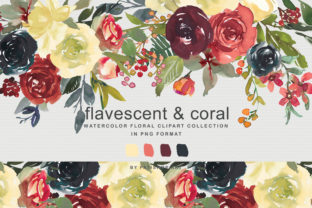
The Flavescent Coral Watercolor Clipart Set offers a specific aesthetic solution for designers seeking warmth without the intensity of bright red or the coolness of standard pink. This collection bridges a gap in floral design assets by providing a yellowish-coral hue that feels organic and hand-painted rather than digitally manufactured. For creators ranging from wedding stationery designers to digital product sellers, understanding the nuances of this particular palette is essential. The set includes 60 PNG files at 300 DPI, comprising six large bouquets, fifty-three individual elements, and two seamless patterns. While these specifications are robust, simply owning the files does not guarantee professional results. Many users overlook critical technical and aesthetic details when integrating watercolor assets, leading to projects that look disjointed or print poorly.
Evaluating Color Accuracy and Palette Consistency
A frequent mistake when acquiring botanical clipart is assuming the on-screen preview matches the final output. With flavescent coral, color management is particularly tricky because monitors display RGB light while printers use CMYK ink. Coral tones often shift toward muddy orange or washed-out beige during conversion if not handled correctly. Before committing this Flavescent Coral Watercolor Clipart Set to a large print run or a finalized digital template, you must verify color integrity.
Do not rely solely on the thumbnail image provided in the marketplace listing. Download the sample file first and test it within your specific workflow. If you are designing for print, perform a physical proof on the actual paper stock you intend to use. Uncoated papers tend to absorb more ink, which can dull the delicate yellow undertones of flavescent coral. Conversely, glossy papers may make the colors appear more saturated than intended. For digital products, check how the coral renders against both white and dark backgrounds. Some watercolor scans lose their subtle edge definition on dark modes, making the florals look like flat stickers rather than painted elements. Taking ten minutes to calibrate your expectations now prevents costly reprints or customer complaints later.
Understanding Resolution and Scaling Limitations
The specification of 300 DPI is the industry standard for high-quality printing, but it is often misunderstood as a license to scale indefinitely. The six main bouquets in this set measure approximately 11 x 9 inches. This is an excellent size for invitation suites, wall art, and packaging, but it has physical limits. A common error occurs when designers attempt to stretch these 11-inch bouquets to fit large-format banners or signage. Stretching a raster PNG beyond its native resolution results in pixelation and blurring that destroys the authentic watercolor texture.
If your project requires dimensions larger than 11 x 9 inches, do not force the bouquet files to work. Instead, utilize the fifty-three smaller separate elements included in the collection. These individual flowers and leaves, sized around 3 x 3 inches or 2 x 3 inches, are designed to be modular. You can arrange them to create custom compositions at any scale without losing quality. Alternatively, leverage the two 16 x 16 inch seamless patterns for background coverage on larger formats. Recognizing the difference between a fixed-size illustration and a scalable pattern is what separates amateur layouts from professional design work. Always check the pixel dimensions before placing an asset, and respect the boundaries of the source material.
Mastering Layering and Transparency
Watercolor clipart relies heavily on transparency to achieve its characteristic soft, blended look. A significant usability issue arises when users treat these PNGs as opaque blocks. Placing a flavescent coral bouquet directly over text or complex photography without considering the transparent edges often leads to readability issues and visual clutter. The "drag and drop" convenience mentioned in the product description should not replace thoughtful composition.
To avoid this, use blending modes in your design software. Setting the layer to Multiply or Screen (depending on your background) allows the paper texture and paint gradients to interact naturally with underlying elements. Furthermore, pay attention to the edges of the separate elements. In watercolor sets, the transition from pigment to transparency is where the realism lives. If you erase or mask these edges too harshly to fit a layout, you remove the very quality that makes the Flavescent Coral Watercolor Clipart Set valuable. Leave the rough, painted edges intact whenever possible. If you need a cleaner silhouette, consider using a soft brush mask rather than a hard selection tool to preserve the organic fade.
Strategic Use of Seamless Patterns vs. Individual Elements
Many buyers focus exclusively on the hero bouquets and neglect the seamless patterns, or vice versa. This imbalance limits the versatility of the purchase. The two 16 x 16 inch seamless patterns included in this set serve a different functional purpose than the standalone florals. A common inefficiency is trying to manually tile individual elements to create a background. This is time-consuming and rarely achieves the perfect alignment of a true seamless pattern.
Conversely, using a seamless pattern as a focal point can look repetitive and mechanical. Evaluate your project hierarchy before selecting assets. Use the 16 x 16 patterns for wrapping paper, textile prints, website backgrounds, or endpapers in journals. Reserve the six large bouquets for focal points like card fronts, poster centers, or social media headers. Utilize the fifty-three smaller elements for transitional spaces, corner accents, or to break up the repetition of the seamless pattern. By assigning the correct asset type to the appropriate design role, you maximize the value of the sixty-file collection and maintain visual interest throughout your project.
Licensing and Commercial Application Checks
Before integrating the Flavescent Coral Watercolor Floral Clipart Collection into products for sale, you must scrutinize the licensing terms. A dangerous assumption is that purchasing a digital asset grants unlimited commercial rights. Licensing varies significantly between creators. Some licenses allow for flattened designs only, meaning you cannot sell editable templates where the end user can extract the original clipart. Others may restrict the number of units sold or require attribution.
Misunderstanding these terms can lead to legal issues or platform takedowns on sites like Etsy or Creative Market. Read the license file included in your download immediately. If you plan to use these florals for client work, ensure the license covers third-party commercial use. If you intend to create digital kits for resale, verify that the flavescent coral elements are sufficiently altered or combined with other assets to meet "new creation" requirements. Clarifying usage rights upfront protects your business and ensures ethical support for the original artist. Never assume; always verify the specific permissions attached to this exact set.
Optimizing File Management for Workflow Efficiency
With sixty individual PNG files, organization becomes a practical necessity rather than a preference. A disorganized asset library slows down production and increases the likelihood of using low-resolution proxies or duplicate files. Do not leave these files in a generic "Downloads" folder. Create a dedicated directory structure specifically for the Flavescent Coral Watercolor Clipart Set.
Consider organizing subfolders by category: Bouquets, Separate Elements, and Patterns. Renaming files to include descriptive tags—such as "coral-peony-large" or "flavescent-leaf-small"—can save hours of searching later. Additionally, keep the original high-resolution masters separate from any resized or optimized versions you create for web use. Accidentally overwriting a 300 DPI master with a 72 DPI web version is a frustrating mistake that compromises future print capability. Establishing a disciplined file management system ensures that the ease of drag-and-drop functionality translates into genuine long-term efficiency across multiple projects.