Beauty Portrait Creator: Your Creative Tool for Custom Fashion Portraits
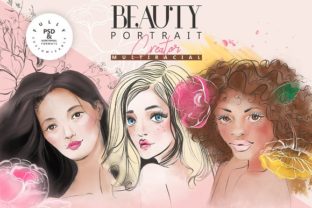
Whether you're a designer looking for visual inspiration or a blogger in need of striking imagery, the Beauty Portrait Creator offers a versatile and intuitive way to craft unique portraits. This digital toolkit lets you start with four distinct base portraits and customize every detail—from skin tone and eye color to makeup styles and artistic backgrounds. It's not about choosing from preset options; it's about creating something truly your own.
How It Works: Start, Customize, Create
The Beauty Portrait Creator gives you a foundation to build upon. You begin with four high-quality, fully editable portraits in layered PSD format. From there, you can:
- Adjust hair color—including ombre effects
- Modify eye color and facial features
- Experiment with makeup styles and expressions
- Change skin tones and facial details
Once your portrait reflects your vision, you can enhance it with artistic elements like floral overlays, brush strokes, and abstract backgrounds. The included vector files and PNGs let you mix and match components to create fresh, original compositions in minutes.
Perfect for a Wide Range of Users
This tool isn't just for professional designers. Its flexibility makes it ideal for a variety of users, from small business owners to creative hobbyists. Here’s how different people are using it:
1. Beauty and Fashion Bloggers
Bloggers often need fresh visuals to accompany articles or mood boards. The Beauty Portrait Creator helps them generate high-quality, on-brand images without hiring a photographer or illustrator. Whether they're showcasing a new makeup trend or a seasonal color palette, they can customize portraits to match their content exactly.
2. Product Packaging Designers
For indie beauty brands or boutique packaging designers, creating a unique aesthetic is key. With this tool, they can design elegant, stylized portraits to feature on product labels, boxes, or promotional materials. The ability to recolor and layer abstract backgrounds ensures the final look aligns with the brand’s identity.
3. Interior Decorators and Artists
Wall art is a booming market, and personalized, artistic prints are in demand. Designers and decorators use the Beauty Portrait Creator to generate modern, high-quality digital portraits that can be printed and framed. The abstract backgrounds and floral elements add a gallery-worthy touch without requiring advanced illustration skills.
4. Social Media Managers and Marketers
Visual content drives engagement, especially on platforms like Instagram and Pinterest. Marketing professionals use this tool to create cohesive, eye-catching graphics for campaigns, promotions, and brand storytelling. The pre-made floral arrangements and lineart elements help maintain a polished, artistic aesthetic across posts.
What You Get in the Package
The Beauty Portrait Creator comes with a comprehensive set of assets that let you customize and combine elements freely:
- 4 fully customizable portraits in layered PSD format
- 4 hand-drawn portrait PNGs with transparent backgrounds
- 9 abstract background elements (transparent PNG)
- 5 pre-made floral lineart arrangements (transparent PNG)
- 14 individual floral elements (transparent PNG)
- 13 ready-to-use portrait variations (transparent PNG)
- Vector EPS10 files for floral arrangements, flowers, and sketched portraits
All of these pieces can be mixed and matched, recolored, and layered to suit your specific needs. Because everything is transparent and organized, you can easily integrate these portraits into your existing design workflows.
Why It Stands Out
Many design tools offer templates, but the Beauty Portrait Creator goes a step further by giving you full control over every element. You’re not limited to preset styles or color schemes. Instead, you can:
- Recolor backgrounds and floral elements to match your palette
- Combine portraits with abstract or floral overlays for a unique aesthetic
- Create unlimited variations without needing advanced illustration skills
This flexibility makes it especially valuable for users who want to maintain a consistent visual style across multiple projects or platforms.
Real-World Scenarios: How People Use It
Here are a few practical examples of how different users apply the Beauty Portrait Creator in their daily work:
Case Study: A Freelance Illustrator
An illustrator working on a book cover needed a stylized female portrait that matched the book’s color scheme and tone. Using the Beauty Portrait Creator, she customized the skin tone, eye color, and background elements to create a unique image that aligned with the story’s mood—without starting from scratch.
Case Study: A Small Business Owner
A boutique skincare brand wanted to feature diverse models on their product packaging but couldn't afford a professional photoshoot. They used the portraits to create clean, artistic visuals that represented a range of skin tones and styles. The result? A cohesive, inclusive product line that stood out on shelves.
Case Study: A Blogger
A fashion blogger preparing a seasonal trend post needed images that reflected the latest color trends. She customized the portraits to match the season’s palette and added floral overlays to give the visuals an editorial feel. The final images enhanced her post’s visual appeal and engagement.
Things to Consider Before Using
While the Beauty Portrait Creator is user-friendly, here are a few things to keep in mind before diving in:
- Software Requirements: To make the most of layered PSD files, you'll need a program like Adobe Photoshop.
- Learning Curve: While no illustration skills are needed, some basic knowledge of design software will help you customize elements more effectively.
- File Sizes: Vector files offer scalability, but they may require conversion depending on your design platform.
Once you get comfortable with the tool, you'll find it’s a time-saving solution for generating high-quality, customizable visuals.
Final Thoughts
The Beauty Portrait Creator isn’t just another design resource—it’s a creative playground. Whether you're designing for a blog, a product, or personal art, it gives you the freedom to explore and experiment without limits. With its high-quality assets, intuitive customization, and endless combinations, it's a smart investment for anyone looking to elevate their visual content quickly and effectively.